Paint Loop: Pixel Puzzle
- 4.7
- Rating
- 50.00K
- Installs
- Free
- Price

 Analysis by App-foxy
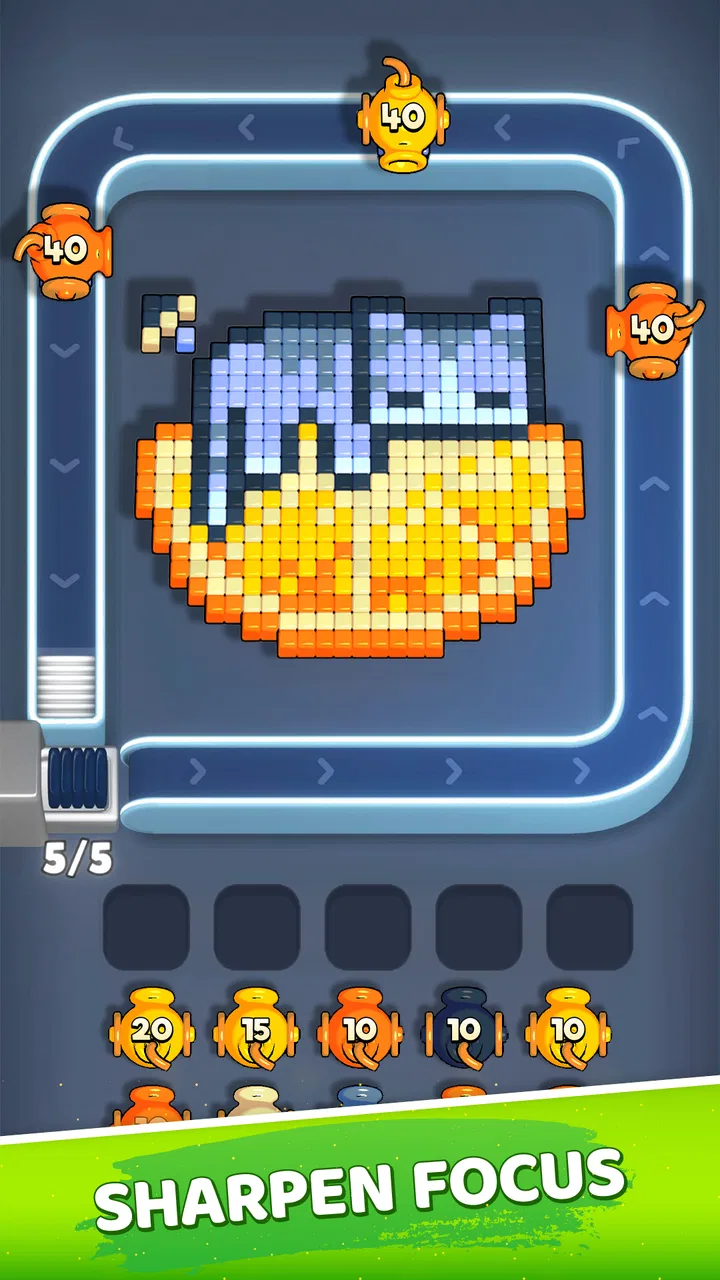
I went into Paint Loop: Pixel Puzzle expecting a quick color-sorting distraction, and that is exactly where it works best. It is a free puzzle game from Unico Games Studio built around fast decisions, visual focus, and reflexes rather than long explanations or a complicated campaign. The basic appeal is immediate: you make a move, see the result, decide whether to continue pushing your speed, and then try to recover when the pace catches you.
That simple structure matters because this is not the kind of game I would choose for a long story, deep character development, or a relaxing board-game session. I see it more as a compact mental warm-up for a spare moment. A short break, a queue, or the few minutes before bed can be enough to get something out of it. The challenge comes from keeping your eyes and hands synchronized while resisting the temptation to act before you have properly read the screen.
How the Paint Loop works when the pace starts rising
I find the rising pace most useful as a cue to adjust my approach, not as a reason to tap harder. When the screen begins to demand quicker choices, I try to keep my eyes moving ahead of my finger and let accuracy set the rhythm; that makes each restart a small test of whether my attention is steady enough to continue. It also helps me notice when a short pause would be more useful than another attempt.
You May Also Like

 Blood Strike: 2.5 Anniversary
Blood Strike’s Loadouts Turn Every Drop Into a Tactical Gamble
A close look at Blood Strike’s custom loadouts: how fast access to signature weapons reshapes its battle royale rhythm, rewards preparation, and narrows the gap between fights.

 Pandora - Music & Podcasts
Pandora’s Music Is Easy to Start, but Harder to Recover
Pandora’s strength is its low-effort path from a seed to a station. Its weak spot is how much confidence it asks you to place in connection, setup, and quiet recovery.

 8 Ball Pool
 Is Built on Rivalries, Rematches, and Routine
A close look at the rivalries, rematches, shared routines, and unanswered safety questions that turn a quick pool match into a persistent mobile community.

 Samsung Music
’s Quiet Strength Is Playing What You Already Own
Its reach comes less from spectacle than from dependable access to a personal library. That simplicity is both the app’s strongest retention engine and its ceiling.

 AccuWeather: Weather Radar
AccuWeather Review: A Quick, Clear Forecast for Everyday Decisions
For everyday plans, the best forecast is the one you can understand quickly. AccuWeather makes rain timing, radar, and local conditions easy to act on, with a few trade-offs.

 Hill Climb Racing
Why Hill Climb Racing Still Turns Crashes Into One More Run
A tiny car, a bumpy hill and one more upgrade: Hill Climb Racing keeps resurfacing because its simple chaos makes every near-miss feel personal.
More From Our News Desk
View All News


The first action is easy to understand
The opening interaction is intentionally approachable. You are sorting painted elements, and the goal is to respond correctly while the game tests your speed and concentration. I did not need a tutorial-heavy introduction to understand what the game wanted from me. That is a real advantage on a phone, where a puzzle that spends too long explaining itself can lose me before the first meaningful move.
What makes the first action more interesting than a basic tap is the need to identify the right visual relationship before committing. The game asks for recognition and timing at the same moment. I found that the early part of a session feels almost automatic, but that confidence can become a problem if I stop looking carefully. The fastest move is not always the best move when the screen becomes busier.
This gives the game a useful entry point for different players. Someone new to quick puzzle games can understand the central task without studying a rulebook, while an experienced player can immediately focus on reducing hesitation. I would not describe it as a traditional logic puzzle with several possible solution paths. Its interest comes from accurate sorting under pressure, not from building a large plan several steps ahead.
One practical tip is to treat the first few moves as a reading phase instead of trying to set a personal speed record immediately. I had better results when I used those opening actions to establish the visual pattern and only then increased my pace. That small change reduces careless errors, especially when I return to the game after a break and my attention has not fully settled.
Feedback creates a steady action-and-response rhythm
The strongest part of the experience is the feedback loop. I make a sorting decision, the game shows whether that decision worked, and the next task invites me to act again before my attention drifts. That rhythm is what turns a basic color puzzle into something more compelling. The pleasure is not just in completing one move; it is in maintaining a clean chain of correct reactions.
Good rounds develop a noticeable cadence. My eyes scan, my finger moves, the result confirms the choice, and I immediately prepare for the next one. When I am focused, the individual actions almost blend together. When I make a mistake or hesitate, the rhythm breaks, and the next attempt becomes a chance to rebuild that flow rather than simply continue from the same mental state.
This is where the title’s loop idea feels appropriate. The game keeps bringing me back to the same basic action, but the pressure changes how that action feels. At a slower pace, sorting is straightforward. At a faster pace, I have to divide my attention between identifying the correct color or arrangement and deciding how quickly I can safely respond. The mechanic stays small, yet the demand on concentration grows.
I also noticed that speed alone is a poor measure of progress. A quick tap that creates an error is less useful than a slightly slower move that preserves the run. Players who naturally rush may need to focus on consistency first. In practice, I found that a stable rhythm usually leads to faster play later, because I spend less time recovering from mistakes and second-guessing the next action.
For an everyday example, I can imagine opening Paint Loop during a short coffee break when I want something more active than scrolling but less demanding than a full game. I can play with one hand, stay engaged for a compact session, and stop when my attention is needed elsewhere. It also suits someone who wants a quick reflex exercise without committing to a match against another person or joining a large online system.
Why the reward is the feeling of control
The reward here is less about collecting a complicated set of items and more about the satisfaction of control. When I sort several elements correctly in succession, I feel that I have found the right visual tempo. The game encourages me to continue because the next action is always close at hand, and a good run creates a small but convincing sense of momentum.
That momentum is important for a puzzle with a narrow central mechanic. If every correct move felt isolated, the experience would become repetitive quickly. Instead, the reward comes from keeping the sequence alive. My attention becomes the resource I am protecting. I am not only asking, “Can I solve this move?” I am also asking, “Can I remain accurate for the next several moves without letting speed turn into panic?”
This makes the game suitable for players who enjoy improving personal performance, even when there is no need for a large progression system. I like games that let me notice a small improvement from one attempt to the next, and this one can provide that feeling through cleaner decisions and fewer rushed responses. It is a modest reward, but it fits the compact design.
There is also a useful mental distinction between a good result and a lucky result. If I succeed because I recognized the pattern and kept a controlled rhythm, I can repeat that approach. If I succeed only because I tapped quickly without thinking, the result is harder to reproduce. That is why I recommend paying attention to the quality of the run, not just whether the last action happened to be correct.
The game’s free price makes it easy to try without a purchase decision at the start. However, optional in-app purchases range from $1.99 to $89.99 per item, so I would advise setting a spending boundary before handing the phone to a child or to anyone who tends to buy impulsively. The game has an Everyone content rating, but age suitability and spending habits are separate questions. A family can reasonably consider the gameplay approachable while still keeping purchases under control.
Resetting a session is part of the design
The reset is not merely a punishment for making a mistake. It changes the emotional tone of the next attempt. After a failed run, I already know where my attention slipped: perhaps I acted before reading the colors, allowed the rhythm to become too fast, or tried to recover from one uncertain move with an even quicker tap. The restart gives me a clear opportunity to correct that specific habit.
This is one reason the game can encourage “one more try” without requiring a large amount of time. A session does not need a long setup, and the basic action is already familiar. The reset removes the need to relearn the rules, so the next attempt begins with a practical question: can I make a better decision this time?
That structure works well for short breaks, but it may frustrate players who dislike repeating a task after a mistake. Paint Loop is not designed around a forgiving narrative or a slow puzzle board where I can calmly undo every move. Its appeal depends on accepting that a failed run is information for the next run. If I want a peaceful experience with no pressure to restart, I would choose a different type of puzzle.
My preferred way to use the reset is to change only one behavior at a time. If I was too fast, I slow the first few actions. If I was too cautious, I focus on making the decision once and committing to it. Trying to change everything at once makes the next attempt feel random. A single adjustment makes the feedback more useful and turns repetition into practice rather than frustration.
Another helpful habit is to stop after a particularly poor run instead of immediately tapping restart several times in frustration. The game is built for quick repetition, but quick repetition is not always productive. A few seconds away from the screen can restore visual attention. When I return, the same simple mechanic feels clearer, and I am less likely to carry the previous mistake into the next attempt.
Who will enjoy this particular puzzle
I would recommend Paint Loop to players who like compact challenges based on observation and reaction. It is a good match for someone who enjoys testing focus in short bursts, especially if they prefer a game that can be understood quickly and revisited often. It may also suit people who want a casual activity that keeps their hands busy while still asking for genuine attention.
The game is less suitable for anyone looking for a story, exploration, character upgrades, or a broad collection of puzzle types. Its identity comes from repeating and refining one central sorting activity. If variety is the main reason you play puzzle games, a larger puzzle collection may give you more value over time. Likewise, players who prefer untimed logic problems may find the reflex emphasis too demanding rather than satisfying.
I would also be cautious about recommending it as a completely relaxing game. The early actions can feel calm, but the challenge is tied to speed and focus. That makes it useful when I want a mental spark, not when I am trying to reduce stimulation. The distinction is important: this is a small concentration test, not a meditative coloring app despite the paint-related theme.
How it compares with familiar puzzle alternatives
Compared with a traditional match-three game, Paint Loop feels more immediate and less focused on planning combinations. Match-three puzzles often reward looking several moves ahead, while this game places more weight on recognizing the current task and responding before the rhythm breaks. I would choose Paint Loop when I want sharper reactions; I would choose match-three when I want to settle into a more deliberate board.
It also differs from word puzzles. Word games give me time to search through possibilities and use language as the main tool. Here, the important skills are visual discrimination, timing, and consistency. That makes it a useful alternative when I am tired of reading but still want something that engages my brain. On the other hand, anyone who enjoys discovering clever meanings or solving layered clues will probably find the central action too narrow.
Against a slow, untimed sorting game, Paint Loop has a stronger sense of urgency. That urgency gives correct sequences more energy, but it also means the game is less accommodating when my concentration is low. I appreciate that trade-off because it makes the experience distinctive, yet I would not pretend it replaces a calm organization puzzle. The better choice depends on whether I want precision under pressure or thoughtful arrangement at my own pace.
Technical fit and the practical ownership questions
On the Android side, the game supports devices running Android 6.0 or later. That gives it a useful reach for people who are not using a very recent phone, although performance can still depend on the individual device and how smoothly it handles touch input. In a reflex-focused game, even a small feeling of delayed response can affect confidence, so I would test the first few rounds before judging my ability too harshly.
The current version is 1.001, and the developer is Unico Games Studio. The game has attracted an average rating of 4.7 from around 1.9 thousand ratings, with more than 50 thousand installs. Those figures suggest that the basic concept has found an audience, but they do not change the central question I would ask before installing: do I enjoy repeating a fast sorting challenge, or do I need more variety from a puzzle game?
Because it is free to install, trying it is straightforward. The purchase range deserves attention, though, particularly for shared devices. I would use the game’s free starting point to decide whether the core loop holds my interest before considering any optional spending. If the repeated action already feels satisfying, there is no need to buy anything simply to understand what the game is about.
The Everyone rating also makes the game broadly approachable from a content perspective. Still, I would explain the purchase situation clearly to younger players rather than assuming that an age rating covers every family concern. For adults, the more relevant issue is whether the game’s quick-reset structure encourages enjoyable practice or turns into a frustrating cycle of repeated attempts.
My verdict on the complete loop
Paint Loop succeeds because its action, feedback, reward, and reset are tightly connected. I sort something, receive an immediate response, feel the satisfaction of preserving a good rhythm, and restart with a clear reason to adjust my approach. The next session begins not because the game needs a complicated excuse, but because I can see exactly how one better decision might extend the run.
That loop is also the game’s main limitation. The same focused design that makes it easy to pick up can make it feel repetitive for players who need new mechanics or a sense of long-term discovery. I would not install it expecting a large puzzle adventure. I would install it as a compact test of visual attention that can occupy a few minutes without demanding a major commitment.
My final recommendation is therefore specific: choose it if you enjoy quick sorting, immediate feedback, and the challenge of turning a mistake into a cleaner restart. Skip it if pressure, repetition, or reflex-based play usually makes puzzle games less enjoyable for you. For my own use, it works best in short sessions, with a focus on controlled accuracy rather than frantic tapping. The best reason to return is the chance to make the next loop cleaner than the last one.
FAQs for Paint Loop: Pixel Puzzle
01What is Paint Loop: Pixel Puzzle and how is it played?
Paint Loop: Pixel Puzzle is a relaxing color and logic game built around completing pixel-style images. Each level presents a visual puzzle that you solve by filling, matching, or arranging colored sections according to the design shown on screen. The controls are simple enough for quick play, but later puzzles require more attention, pattern recognition, and careful decisions to avoid placing colors incorrectly.
02Is Paint Loop: Pixel Puzzle suitable for children and casual players?
The game is generally suitable for casual players and older children because it uses straightforward touch controls and does not require advanced gaming experience. Its colorful pixel-art presentation and gradual puzzle progression make it easy to understand. Parents should still review the app’s age rating, advertising, in-app purchase information, and privacy details before allowing younger children to use it independently.
03Does Paint Loop: Pixel Puzzle work offline?
Many puzzle sessions can usually be enjoyed without a constant internet connection, which makes the game convenient for travel or short breaks away from Wi-Fi. However, certain features may depend on connectivity, including advertisements, rewards, analytics, updates, or online content. If offline access is important to you, test the game after disabling mobile data and Wi-Fi, since behavior can vary between versions.
04Are there advertisements or in-app purchases in Paint Loop: Pixel Puzzle?
Paint Loop: Pixel Puzzle may include advertising and optional in-app purchases, depending on the version and platform available on your device. Ads can appear between levels or when claiming additional rewards, while purchases may offer convenience features or remove advertising. Before downloading, check the official store listing for current pricing, subscription information, and whether purchases are protected by your device’s parental controls.
05What should I check before downloading Paint Loop: Pixel Puzzle?
Before installing Paint Loop: Pixel Puzzle, check that your Android or iOS device meets the listed operating-system requirements and has enough free storage. It is also worth reviewing recent user feedback about performance, advertisements, game difficulty, and progress saving. Downloading through the official Google Play Store or Apple App Store is recommended, as this helps ensure you receive the legitimate, updated version of the application.
Pros
- Simple controls make it easy to start playing immediately.
- Short levels are ideal for quick breaks or casual sessions.
- Pixel-art visuals are colorful
- clear
- and pleasant to view.
- Gradual challenges help players improve pattern recognition.
- Works well for relaxing play without requiring fast reactions.
Cons
- Some puzzles may feel repetitive after extended play.
- Later levels can become frustrating without clear solution guidance.
- Frequent ads may interrupt the flow between puzzle attempts.
- Limited gameplay variety may reduce long-term replay value.
- Small pixel details can be difficult to distinguish on smaller screens.

Paint Loop: Pixel Puzzle
Gallery